Tool Insights
Home > Tools > Tool Details

Chatbase

Description

AI-powered chatbot platform that automates lead capture, support, and customer engagement.
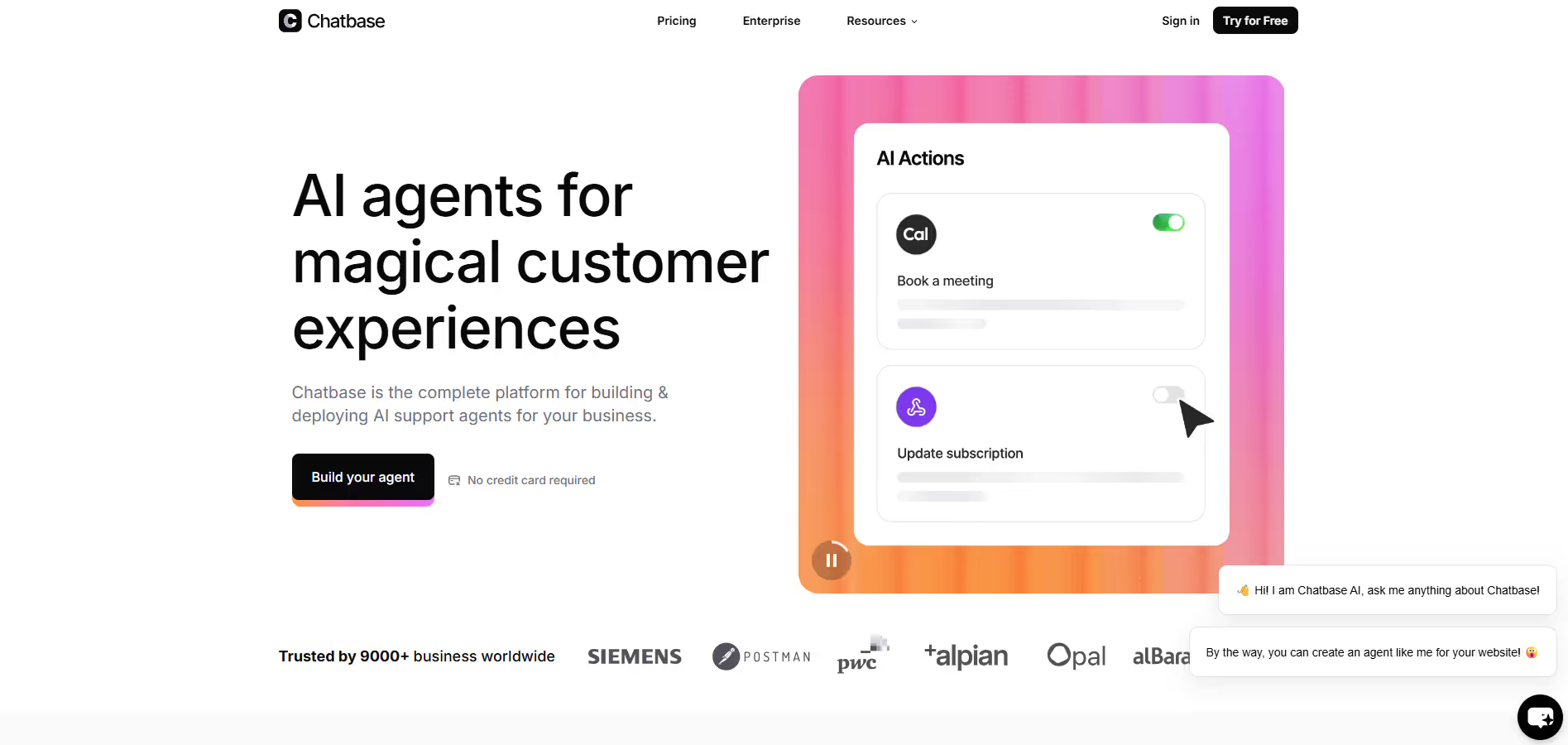
Chatbase is a platform for building and deploying custom AI agents (chatbots) trained on your own data—such as websites, FAQs, documents—and automating workflows like lead qualification, customer support, and engagement. It supports integrations, embeds, analytics, and “AI Actions” (bots can perform tasks beyond just answering).The platform is used by businesses to reduce repetitive support queries, qualify leads before passing them to sales, and maintain a presence that works 24/7. Its strengths lie in easy setup, good performance, and scalable tiers.

Key Applications

  • Automating customer support by answering FAQs and troubleshooting common issues.
  • Lead capture and qualification via chat interactions, gathering info and routing leads.
  • Embedding chatbots on websites to assist visitors and reduce support load.
  • Monitoring user engagement and gaining insights via analytics to improve content or support.
Black dot centered on a transparent background.
A red round push button with a white dot in the center on a black base.
Black solid circle on a white background.
Vector illustration of a large white and purple feather.
Purple dot on a transparent gray grid background.
White dot on a solid black background.

Who It’s For

Chatbase is for businesses of various sizes—from startups to enterprises—who want smarter customer engagement without hiring big support teams. It helps marketers, support teams, and product owners who deal with repetitive questions, want to qualify leads automatically, or want 24/7 presence. If your team spends time answering FAQs, manually filtering leads, or wants to embed AI assistance on your site, Chatbase helps lighten that load.

Pros & Cons

Pros Cons
✔️ Very quick to set up and train with your own content. :contentReference[oaicite:15]{index=15} ✖️ Free plan has strict limits on message credits, agents, and inactivity deletion. :contentReference[oaicite:16]{index=16}
✔️ Good analytics and integrations to support marketing workflows. :contentReference[oaicite:17]{index=17} ✖️ Higher-tier plans get expensive, especially for high-volume use. :contentReference[oaicite:18]{index=18}
✔️ Useful add-ons: custom domain, branding removal, extra agents. :contentReference[oaicite:19]{index=19} ✖️ Complex workflows or deep branching conversations may not be as flexible as some specialist tools. :contentReference[oaicite:20]{index=20}
Pros Cons
Very beginner-friendly Limited features compared to Others
Clean interface Less feature depth than others
Helpful community and resources Can feel slower at scale

How It Compares

  • Versus basic chat widgets / FAQ tools: Offers smarter, AI-trained response capability and automation actions.
  • Versus full marketing suites (HubSpot, ActiveCampaign): Easier to set up for chat, but less deep in email flows, multi-channel campaign logic, or CRM power.
  • Versus custom self-built AI agents: Faster deployment, less maintenance, but limits in custom logic, high usage, or branding may require paid plans.
White cursor pointer clicking on a blue dotted line with a small blue square at the end.
Black square with a fine white pixel border on a transparent background.
White scientific dot or connector symbol on a transparent background.
White circle with black dots scattered unevenly inside, resembling Braille pattern.

Bullet Point Features

  • Train chatbots with your documents, web pages, and FAQs for tailored knowledge.
  • AI Actions to trigger tasks, follow-ups, or route leads automatically.
  • Analytics & insights: see what users ask, where responses fall short, and adjust.
  • Integrations & embedding: website embed, API access, linking to other tools.
  • Add-ons for custom domain, removing branding, extra agents, and message credits.
Black dot centered on a white background.
Black dot on a white background.
Black circle with a white dot in the center on a transparent background.
White dot on a solid black background.
Black dot centered on a white square background.
Blue circle with a white checkmark in the center.

Frequently Asked Questions

Find quick answers about this tool’s features, usage ,Compares, and support to get started with confidence.

What is Chatbase and how does it help my business?
Plus sign icon with small dots forming a grid inside the shape.

Chatbase is a powerful AI platform that lets businesses build and deploy custom AI support agents trained on their own data, such as website content, documents, knowledge bases, and FAQs. Instead of using generic bots that provide generic answers, Chatbase’s agents deliver accurate, contextual responses tailored to your business information, helping customers find answers faster and more reliably around the clock. This makes it ideal for enhancing customer support, reducing support ticket volumes, and improving user engagement without needing in‑house staff for every interaction.

How does Chatbase AI work and do I need technical skills to use it?
Green circle with a white plus sign in the center.

Chatbase works by analyzing the data you provide — such as URLs, PDF files, text documents, or knowledge articles — and training an AI agent that understands that content deeply. You can then embed this agent on your website, app, or messaging channel with a simple setup, usually in minutes, without coding. The platform’s visual interface and no‑code tools make it accessible to non‑technical users, while developers can take advantage of APIs for deeper integration if needed.

What features does Chatbase offer for customer support and engagement?
Mathematical equation with a large plus sign highlighted in yellow background.

Chatbase includes a broad set of features such as real‑time answer generation from trained data, smart escalation to human agents, actions tied to your systems (like checking orders or managing subscriptions), and analytics to track agent performance and customer behavior. It supports multilingual conversations, integrates with popular business tools like Slack, WhatsApp, Zendesk, and Salesforce, and lets you experiment with different AI models to get the best results for your use case.

Can Chatbase help with lead generation and business workflows?
White plus sign on a transparent background.

Yes, Chatbase is not just for answering questions — it can also capture and manage leads during conversations and help streamline business processes by integrating with CRMs and backend systems. For example, the AI agent can collect visitor information, qualify prospects, and even trigger automated workflows or actions based on natural language queries, making it a valuable tool for marketing, sales, and support teams alike.

Who should use Chatbase and what are the pricing options?
Mathematical puzzle image showing a 9+4=2 equation with colorful number tiles on a blue grid background.

Chatbase is ideal for customer support teams, digital businesses, e‑commerce sites, SaaS companies, and any organization that wants to improve customer interaction without constantly scaling human resources. It offers a range of pricing plans from a free tier (with limited credits and basic AI agent capabilities) to Hobby, Standard, Pro, and Enterprise plans with higher message capacities, advanced analytics, integrations, and team access. Add‑ons also let you increase message credits, deploy more agents, or remove branding to fit your specific needs.

Chatbase
White text reading 'COMING SOON' on a dark blue background with scattered light particles and a glowing horizontal light effect.
#AIChatbot #CustomerSupport #DataTraining
Freemium
Marketing Automation

Disclosure

All product names, logos and brands are property of their respective owners. Use is for educational and informational purposes only and does not imply endorsement. Links are to third-party sites not affiliated with Barndoor AI. Please see our Terms & Conditions for additional information.

Reviews from Our Users

Five white stars in green squares indicating a five-star rating.
8.07.2021
Trustpilot company logo featuring a green star above the word Trustpilot in white on a dark background.

"Overall, I like the core features, but the mobile UI still feels a bit clunky. Hope they fix this in future updates."

Smiling young man with short brown hair wearing a white shirt, set against a dark blue background with yellow circular patterns.
Tom W.
Marketing Manager
trustplilot-img
06/10/2025
Trustpilot logo featuring a green star above the white text 'Trustpilot' on a dark blue circular background.

"Their support team actually listens to feedback! I’ve seen new features added within weeks. That’s impressive.''

Smiling young man with dark hair and light facial hair on a dark blue background with yellow circular accents.
Alex Carter
Freelancer
Five white stars in green squares representing a five-star rating.
03/09/2025
Trustpilot logo featuring a green star above the word 'Trustpilot' on a dark blue circular background.

"Some advanced options take a bit of time to understand, but once you get the hang of it, it’s incredibly powerful."

Smiling man with beard and glasses wearing a gray suit jacket and white shirt against a light gray background.
Ryan Blake
SaaS Consultant
Five white stars on green squares indicating a five-star rating.
12/08/2025
Trustpilot logo with a green star and white text on a dark background.

"I’ve tried several similar tools, but this one stands out for its clean interface and automation features. Totally worth the subscription."

Smiling young woman with long brown hair wearing a gray blazer and white shirt against a plain light background.
Sarah Mitchell
GrowthWave Agency