TidyCal
Key Applications
- Appointment Scheduling: Create and manage various types of appointments, including one-on-one, group, and collective meetings.
- Calendar Synchronization: Integrate with multiple calendars such as Google Calendar and Office 365 to ensure seamless scheduling and avoid conflicts.
- Custom Booking Pages: Design personalized booking pages to match your brand, with options to add your logo and color scheme.
- Automated Reminders: Set up automatic email confirmations and reminders to reduce no-shows and keep clients informed.
Who It’s For
TidyCal is ideal for freelancers, consultants, coaches, and small businesses seeking an affordable and user-friendly scheduling solution. Its intuitive interface and customizable features make it suitable for individuals and teams aiming to streamline their booking processes without the complexity of larger enterprise solutions.
Pros & Cons
"
| Pros |
Cons |
| ✔ One-time lifetime pricing—no monthly subscription. |
✖ No native mobile app; web-based only. |
| ✔ Unlimited booking types and unlimited bookings. |
✖ Less advanced features compared to big players for enterprise needs. |
| ✔ Supports payments (Stripe, PayPal), calendar integrations, and meeting link tools. |
✖ Limited branding/customization on free plan and lower tiers. |
"
| Pros |
Cons |
| ✔ Very beginner-friendly |
✖ Limited features compared to Others |
| ✔ Clean interface |
✖ Less feature depth than others |
| ✔ Helpful community and resources |
✖ Can feel slower at scale |
How It Compares
- Versus Calendly: TidyCal offers a one-time payment model, providing lifetime access for a single fee, whereas Calendly operates on a subscription basis. This makes TidyCal a cost-effective choice for users seeking basic scheduling features without ongoing costs.
- Versus Other Scheduling Tools: Compared to other scheduling tools, TidyCal provides a straightforward setup with essential features like calendar synchronization, custom booking pages, and payment integration, catering to the needs of solo entrepreneurs and small teams.
Bullet Point Features
- One-time payment of $39 for lifetime access.
- Integrates with Google Calendar and Office 365.
- Customizable booking pages with branding options.
- Automated email confirmations and reminders.
- Supports paid bookings through integrated payment processors.
- Team scheduling features including round-robin and collective bookings.
- Embeddable booking page for seamless website integration.
- No mobile app currently available.
Frequently Asked Questions
Find quick answers about this tool’s features, usage ,Compares, and support to get started with confidence.
What is TidyCal and what is it used for?

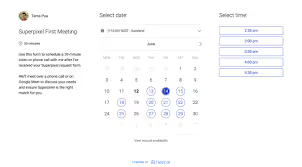
TidyCal is a simple and affordable appointment scheduling tool that helps users book meetings without back-and-forth emails. It provides a clean scheduling page where others can choose available time slots for calls, demos, or consultations.
How does TidyCal simplify scheduling meetings?

TidyCal lets users set availability, share booking links, and accept appointments directly. When someone books a time, it automatically syncs with your calendar and eliminates the need for manual scheduling.
What features does TidyCal offer?

TidyCal includes customizable scheduling pages, calendar sync (Google & others), multiple event types, time zone detection, buffer times, and confirmation notifications. These features help users manage appointments efficiently and professionally.
Is TidyCal suitable for beginners?

Yes, TidyCal is beginner-friendly with a minimal, intuitive interface. Users can set up their scheduling page in minutes without technical skills or training.
Who should use TidyCal and what benefits can they expect?

TidyCal is ideal for freelancers, consultants, coaches, small business owners, and busy professionals. Users can expect fewer scheduling conflicts, saved time, easier meeting coordination, automated bookings, and a professional booking experience, helping streamline daily workflows.