AI made outreach faster, but it also made a lot of outreach sound the same. This guide takes that email apart line by line, rebuilds it, and shows where an AI text humanizer fits into an outreach workflow, along with where it doesn't. If you want to make AI writing human enough that people actually reply, the fixes are smaller than you'd think.
Why Robotic Email Costs More Than You Think
Readers are getting good at spotting machine-written email, and they act on it. In an Adobe Express survey of 1,007 US consumers, 18% said they had already unsubscribed from a brand email because they suspected AI wrote it, and 46% said they'd be more likely to unsubscribe if an email was clearly AI-written. The same survey found 37% trust brands more when emails feel human, even if they're less polished.
The trust hit isn't limited to marketing. A University of Florida study of 1,100 professionals found that when supervisors relied heavily on AI to write messages, only 40% to 52% of employees saw them as sincere, compared with 83% when AI assistance was low. For outreach, sincerity is the whole game. A cold email has one job: convince a stranger that a real person with a real reason is on the other end.
The Autopsy: Six Lines, Six Tells
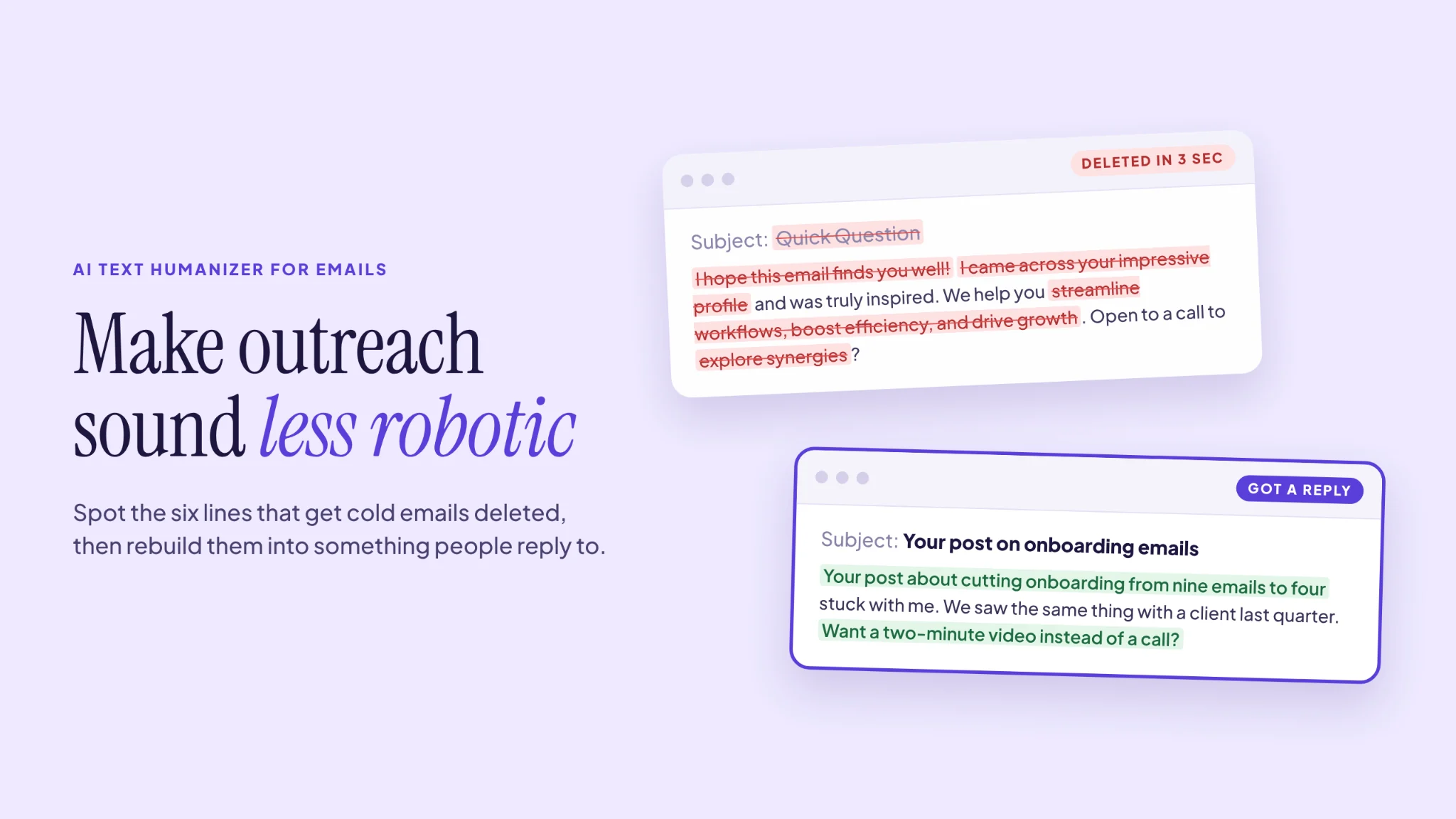
Before you can make AI writing human, it helps to see exactly what gives it away. Here's the original, line by line.
1. "Quick Question." The subject line has been used so often that it now signals a template. It also isn't a question.
2. "I hope this email finds you well!" A filler opener that wastes the most valuable line in the email, the one shown in the inbox preview.
3. "I came across your impressive profile and was truly inspired." Fake personalization. It could be sent to anyone, which is exactly how it reads. Flattery without a specific detail is worse than no flattery at all.
4. "Streamline workflows, boost efficiency, and drive growth." The AI triplet: three vague benefits in a row, none of them measurable. Readers skim straight past it.
5. "Empowers teams to unlock their full potential." Brochure language. Nobody talks like this out loud, so nobody believes it in writing.
6. "A quick 15-minute call to explore potential synergies." A big ask with a fuzzy purpose. "Synergies" tells the reader you don't yet know why you're talking to them.
The Rebuild
Here's the same email after a human pass:
Subject: Your post on onboarding emails
Hi Sarah,
Your LinkedIn post about cutting your onboarding sequence from nine emails to four stuck with me. We saw the same thing with a client last quarter: fewer emails, more replies.
We build tools that help small marketing teams test changes like that without a developer. Worth a look? If so, I can send a two-minute video instead of booking a call.
Alex
It's shorter and more specific, and it's easy to say yes to. The subject line references something real. The first line proves Alex actually read something. The ask is small. And the language sounds like a person talking.
Length matters here too. Boomerang's analysis of email replies found that messages of 50 to 125 words had response rates above 50%, and emails written at a third-grade reading level got 36% more responses than those written at a college level. The data is from 2016, but the principle holds up: plain, short emails get answered. That's the core of how to make AI writing human in an inbox: fewer words, plainer words, and one real detail.
Where an AI Text Humanizer Fits (and Where It Doesn't)
An AI text humanizer rewrites text to remove the rhythm and phrasing that make writing sound machine-made. For email, that's useful in some places and pointless in others.
Where it helps:
- The body paragraph. When AI writes the "what we do" section, it tends toward triplets and brochure words. A humanizer pass usually breaks those up and swaps in plainer words.
- Templates you'll reuse. If a follow-up template goes out hundreds of times, smoothing it once with an AI text humanizer before you load it into your sequence pays off on every send.
- Newsletters and longer emails. These are closer to blog content, and a humanizer can loosen stiff transitions across several paragraphs.
Where it can't help:
- Personalization. No tool knows that Sarah wrote a post about onboarding emails. The specific, researched first line has to come from you.
- The ask. Deciding what you want and keeping it small is a judgment call that no rewrite can make for you.
- Accuracy. Any rewrite can soften a claim or change a detail. Read every humanized email before it goes out, especially anything with numbers or names.
A Simple Outreach Workflow
- Research first. Spend two minutes finding one real detail about the recipient: a post, a product launch, a hire, a talk.
- Prompt with the detail. Give your AI tool the detail, your offer in one sentence, and a word limit of around 100. Tell it to avoid "I hope this finds you well," "quick question," and "synergy."
- Humanize the body. Run the middle paragraph through an AI text humanizer if it still sounds like a brochure.
- Write the first line and the ask yourself. These two lines decide whether someone replies. Don't outsource them.
- Read it aloud. If you wouldn't say it to Sarah's face, rewrite it.
This takes maybe four or five minutes per email. For high-value prospects, it's time well spent. For bulk sends, do the full process on your templates and just the research step for each contact.
A Note on Spam Filters and Detectors
Inbox providers don't publish exactly how they filter mail, and there's no reliable evidence that they penalize email simply for being AI-written. What they do watch is engagement: replies, deletes, and spam reports. Robotic emails tend to get fewer replies and more "mark as spam" clicks, which hurts deliverability over time. So the case for humanizing is mostly about the reader, with deliverability as a side benefit.
Pre-Send Checklist
- Does the subject line refer to something specific to this person?
- Does the first line prove you read or saw something real?
- Is the email under about 125 words?
- Have you removed filler openers, triplets, and brochure words?
- Is the ask small and clear?
- Would you be comfortable reading it out loud to the recipient?
Write Like Someone Worth Replying To
AI is a fine first-draft writer for email. It just doesn't know your prospect, your reason for writing, or how you actually talk. An AI text humanizer can clean up the phrasing, and a good prompt can keep the length in check. The rest comes from two minutes of research and a first line that only you could have written.
Do that, and you'll make AI writing human in the way that counts most for outreach: Sarah reads past the preview and hits reply.